A Slack Attendance Bot
for Automatic Time Tracking
Clock in and out with a Slack command, right where your team already works.
※This total includes users of our Discord version.
What teams deal with before SlashClock
Full HR/attendance systems cost more than a small team needs
Payroll modules, approval chains, policy builders — most of it sits unused. See which features actually matter →
Finding a past clock-in means scrolling through the channel
Everyone posts "in" and "out" in an attendance channel, and someone has to scroll back through it all at month-end.
No way to tell if the total is actually right
Hours get added up by hand, with nothing to check the math against.
Multiple breaks make the math harder
Each break adds another time gap that has to be subtracted from the total by hand.
Adding up hours by hand takes a long time
Adding up a month's worth of clock-ins by hand can take a few hours on its own.
What SlashClock does
Clock in from any channel
Type /clock-in wherever you already are in Slack.
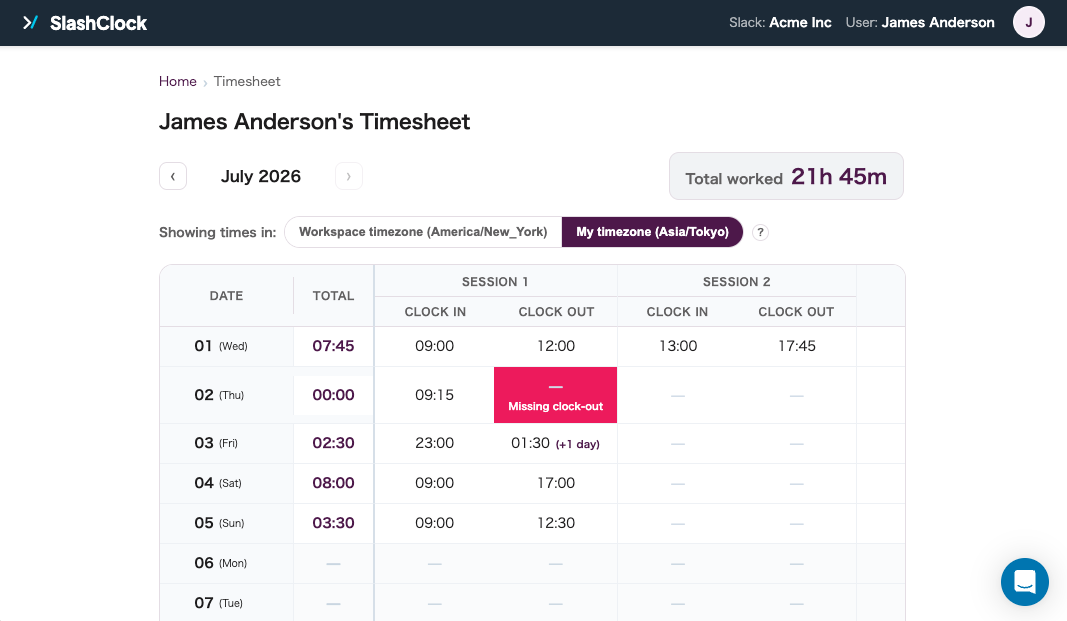
Missed or invalid clock-outs get flagged
A forgotten or backwards entry is caught right in Slack, not discovered at month-end.
Monthly hours, calculated automatically
Every clock-in and clock-out rolls up into daily and monthly totals on the dashboard.
Separate admin and member permissions
Admins manage members and settings; everyone else just clocks in and out.
Works across time zones
One shared timezone anchors the totals; each person still sees their own local time.
Add, edit, or delete records from the dashboard
Every change is logged with a before-and-after, so nothing gets edited quietly.
Pricing
Full access to every feature for your first month.
- Unlimited use of all features
- No limit on member count
- Set up in under a minute
- No credit card required
- Unlimited use of all features
- One flat price, no matter how many people clock in
- Your trial data carries over
- Cancel anytime from the dashboard
- Past data stays viewable after cancellation
Questions people ask before adding SlashClock
Q. What is a Slack attendance bot?
A Slack attendance bot lets your team clock in and out from inside Slack, usually with a slash command, and turns those clock-ins into hour totals without a separate app or login. SlashClock is a Slack attendance bot built for teams that only need clocking in and out, not a full HR or payroll suite. Read more about this approach →
Q. How is this different from Slack's own built-in features?
Slack doesn't have a built-in way to track attendance — no clock-in/out, no hour totals. SlashClock is the Slack attendance bot that fills that gap; without it, most teams end up improvising with channel messages or a shared spreadsheet instead.
Q. How do I sign up?
Add the bot to your Slack workspace and sign in with the Slack account you already have — no new email or password to set up. From there, an admin adds the people who need to clock in from the dashboard, and everyone's ready to go.
Q. What does it cost?
$3/month, flat — no matter how many people clock in. The first month is free with every feature unlocked, no card required. You can cancel from the dashboard at any time, and your past records stay readable even after you do.
Q. Is there a free trial?
Yes — you can run SlashClock as a free Slack attendance bot for a full month, with every feature unlocked and no card required. After that you can choose to move to a paid plan; nothing gets charged automatically.
Q. How is it different from a dedicated tool like AttendanceBot?
SlashClock only handles attendance — clocking in and out, and reviewing or correcting that data. Tools like AttendanceBot bundle in PTO, scheduling, and payroll integrations too, which is more than most small teams need. See the full comparison →
Q. How does it handle a team spread across time zones?
An admin sets one working timezone for the whole company, which is what monthly totals are calculated against. Each person can still view their own timesheet converted to their local time — the company timezone just stays the single source of truth so the numbers never contradict each other. Hiring across borders also raises the separate question of contractor vs. employer-of-record status — see AOR vs EOR →
Q. Does this work for a team of contractors or freelancers, not just employees?
Yes — there's no PTO or payroll setup required, so it works as well for an hourly contractor or freelance team as it does for employees. See how contractor teams use it →
Calculate hours automatically, right in Slack
Add SlashClock, the Slack attendance bot, and your team can start clocking in today.
No policy setup, no separate login.